OverTheWire Bandit Level 5 -> 6
OverTheWire Bandit Level 5 -> 6OverTheWire Bandit Level 5 -> 6OverTheWire Bandit Level 5에서 Level 6으로 가는 풀이OverTheWire Bandit Level 5 to Level 6 writeup
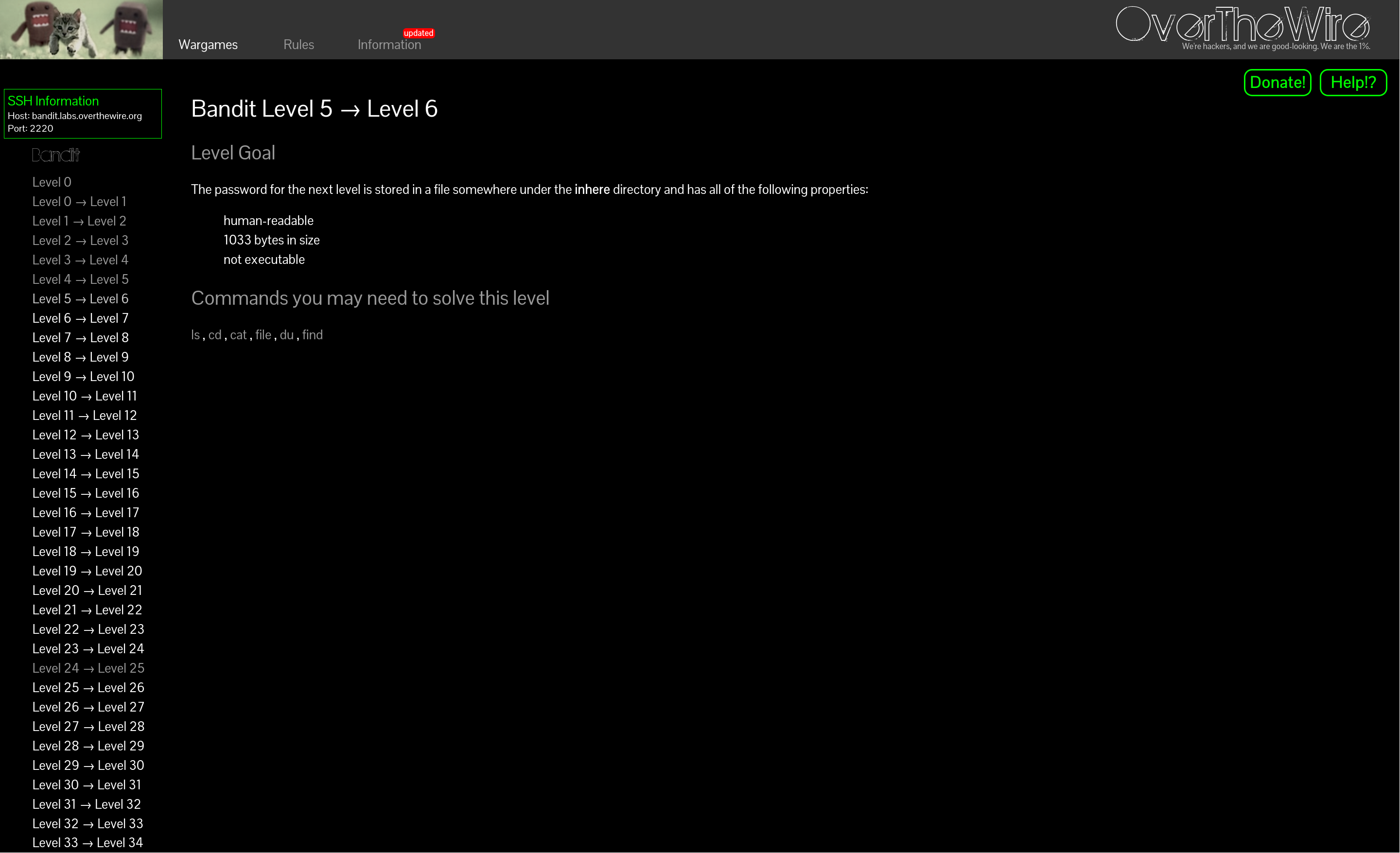
axii@fedora:~/bandit$ ssh bandit5@bandit.labs.overthewire.org -p 2220

bandit5@bandit:~$ ls -al
total 24
drwxr-xr-x   3 root root    4096 Apr  3 15:18 .
drwxr-xr-x 150 root root    4096 Apr  3 15:20 ..
-rw-r--r--   1 root root     220 Mar 31  2024 .bash_logout
-rw-r--r--   1 root root    3851 Apr  3 15:10 .bashrc
drwxr-x---  22 root bandit5 4096 Apr  3 15:18 inhere
-rw-r--r--   1 root root     807 Mar 31  2024 .profile
bandit5@bandit:~$ cd inhere/
bandit5@bandit:~/inhere$ ls -al
total 88
drwxr-x--- 22 root bandit5 4096 Apr  3 15:18 .
drwxr-xr-x  3 root root    4096 Apr  3 15:18 ..
drwxr-x---  2 root bandit5 4096 Apr  3 15:18 maybehere00
drwxr-x---  2 root bandit5 4096 Apr  3 15:18 maybehere01
drwxr-x---  2 root bandit5 4096 Apr  3 15:18 maybehere02
drwxr-x---  2 root bandit5 4096 Apr  3 15:18 maybehere03
drwxr-x---  2 root bandit5 4096 Apr  3 15:18 maybehere04
drwxr-x---  2 root bandit5 4096 Apr  3 15:18 maybehere05
drwxr-x---  2 root bandit5 4096 Apr  3 15:18 maybehere06
drwxr-x---  2 root bandit5 4096 Apr  3 15:18 maybehere07
drwxr-x---  2 root bandit5 4096 Apr  3 15:18 maybehere08
drwxr-x---  2 root bandit5 4096 Apr  3 15:18 maybehere09
drwxr-x---  2 root bandit5 4096 Apr  3 15:18 maybehere10
drwxr-x---  2 root bandit5 4096 Apr  3 15:18 maybehere11
drwxr-x---  2 root bandit5 4096 Apr  3 15:18 maybehere12
drwxr-x---  2 root bandit5 4096 Apr  3 15:18 maybehere13
drwxr-x---  2 root bandit5 4096 Apr  3 15:18 maybehere14
drwxr-x---  2 root bandit5 4096 Apr  3 15:18 maybehere15
drwxr-x---  2 root bandit5 4096 Apr  3 15:18 maybehere16
drwxr-x---  2 root bandit5 4096 Apr  3 15:18 maybehere17
drwxr-x---  2 root bandit5 4096 Apr  3 15:18 maybehere18
drwxr-x---  2 root bandit5 4096 Apr  3 15:18 maybehere19
bandit5@bandit:~/inhere$ file ./*
./maybehere00: directory
./maybehere01: directory
./maybehere02: directory
./maybehere03: directory
./maybehere04: directory
./maybehere05: directory
./maybehere06: directory
./maybehere07: directory
./maybehere08: directory
./maybehere09: directory
./maybehere10: directory
./maybehere11: directory
./maybehere12: directory
./maybehere13: directory
./maybehere14: directory
./maybehere15: directory
./maybehere16: directory
./maybehere17: directory
./maybehere18: directory
./maybehere19: directory
bandit5@bandit:~/inhere$ find . -size 1033c ! -excutable
find: unknown predicate `-excutable'
bandit5@bandit:~/inhere$ find . -size 1033c ! -executable
./maybehere07/.file2
bandit5@bandit:~/inhere$ cat ./maybehere07/.file2
<redacted>뭔가 find로 검색해야겠다는 건 알겠는데 정확한 옵션이 생각이 안 나서 주어진 find 링크로 가서 찾았다.
-size
    n[cwbkMG]
  File uses less than, more than or exactly n units of space,
      rounding up. The following suffixes can be used:

`c'
  for bytes

! expr
  True if expr is false. This character will also usually need
      protection from interpretation by the shell.

-executable
  Matches files which are executable and directories which are searchable
      (in a file name resolution sense) by the current user. This takes into
      account access control lists and other permissions artefacts which the
      -perm test ignores. This test makes use of the access(2)
      system call, and so can be fooled by NFS servers which do UID mapping (or
      root-squashing), since many systems implement access(2) in the
      client's kernel and so cannot make use of the UID mapping information held
      on the server. Because this test is based only on the result of the
      access(2) system call, there is no guarantee that a file for which
      this test succeeds can actually be executed.
axii@fedora:~/bandit$ ssh bandit5@bandit.labs.overthewire.org -p 2220

bandit5@bandit:~$ ls -al
total 24
drwxr-xr-x   3 root root    4096 Apr  3 15:18 .
drwxr-xr-x 150 root root    4096 Apr  3 15:20 ..
-rw-r--r--   1 root root     220 Mar 31  2024 .bash_logout
-rw-r--r--   1 root root    3851 Apr  3 15:10 .bashrc
drwxr-x---  22 root bandit5 4096 Apr  3 15:18 inhere
-rw-r--r--   1 root root     807 Mar 31  2024 .profile
bandit5@bandit:~$ cd inhere/
bandit5@bandit:~/inhere$ ls -al
total 88
drwxr-x--- 22 root bandit5 4096 Apr  3 15:18 .
drwxr-xr-x  3 root root    4096 Apr  3 15:18 ..
drwxr-x---  2 root bandit5 4096 Apr  3 15:18 maybehere00
drwxr-x---  2 root bandit5 4096 Apr  3 15:18 maybehere01
drwxr-x---  2 root bandit5 4096 Apr  3 15:18 maybehere02
drwxr-x---  2 root bandit5 4096 Apr  3 15:18 maybehere03
drwxr-x---  2 root bandit5 4096 Apr  3 15:18 maybehere04
drwxr-x---  2 root bandit5 4096 Apr  3 15:18 maybehere05
drwxr-x---  2 root bandit5 4096 Apr  3 15:18 maybehere06
drwxr-x---  2 root bandit5 4096 Apr  3 15:18 maybehere07
drwxr-x---  2 root bandit5 4096 Apr  3 15:18 maybehere08
drwxr-x---  2 root bandit5 4096 Apr  3 15:18 maybehere09
drwxr-x---  2 root bandit5 4096 Apr  3 15:18 maybehere10
drwxr-x---  2 root bandit5 4096 Apr  3 15:18 maybehere11
drwxr-x---  2 root bandit5 4096 Apr  3 15:18 maybehere12
drwxr-x---  2 root bandit5 4096 Apr  3 15:18 maybehere13
drwxr-x---  2 root bandit5 4096 Apr  3 15:18 maybehere14
drwxr-x---  2 root bandit5 4096 Apr  3 15:18 maybehere15
drwxr-x---  2 root bandit5 4096 Apr  3 15:18 maybehere16
drwxr-x---  2 root bandit5 4096 Apr  3 15:18 maybehere17
drwxr-x---  2 root bandit5 4096 Apr  3 15:18 maybehere18
drwxr-x---  2 root bandit5 4096 Apr  3 15:18 maybehere19
bandit5@bandit:~/inhere$ file ./*
./maybehere00: directory
./maybehere01: directory
./maybehere02: directory
./maybehere03: directory
./maybehere04: directory
./maybehere05: directory
./maybehere06: directory
./maybehere07: directory
./maybehere08: directory
./maybehere09: directory
./maybehere10: directory
./maybehere11: directory
./maybehere12: directory
./maybehere13: directory
./maybehere14: directory
./maybehere15: directory
./maybehere16: directory
./maybehere17: directory
./maybehere18: directory
./maybehere19: directory
bandit5@bandit:~/inhere$ find . -size 1033c ! -excutable
find: unknown predicate `-excutable'
bandit5@bandit:~/inhere$ find . -size 1033c ! -executable
./maybehere07/.file2
bandit5@bandit:~/inhere$ cat ./maybehere07/.file2
<redacted>I knew I had to search with find, but I couldn't remember the exact options, so I looked them up via the provided find manual link.
-size
    n[cwbkMG]
  File uses less than, more than or exactly n units of space,
      rounding up. The following suffixes can be used:

`c'
  for bytes

! expr
  True if expr is false. This character will also usually need
      protection from interpretation by the shell.

-executable
  Matches files which are executable and directories which are searchable
      (in a file name resolution sense) by the current user. This takes into
      account access control lists and other permissions artefacts which the
      -perm test ignores. This test makes use of the access(2)
      system call, and so can be fooled by NFS servers which do UID mapping (or
      root-squashing), since many systems implement access(2) in the
      client's kernel and so cannot make use of the UID mapping information held
      on the server. Because this test is based only on the result of the
      access(2) system call, there is no guarantee that a file for which
      this test succeeds can actually be executed.